Replikanto Review: the NinjaTrader Trade Copier for Prop Firm Accounts

Replikanto is a FlowBots add-on for NinjaTrader 8 on Windows that copies one leader account's orders to your follower accounts. Licenses are listed from $249 (1 year) and $299 (lifetime). Most prop firms we read allow copying between your own accounts; Earn2Trade bans copiers.
Product facts read on FlowBots' own pages on November 20, 2026; firm rules from our copy trading guide, read the same day. Sources. This page has no score or rating.
What Replikanto Does
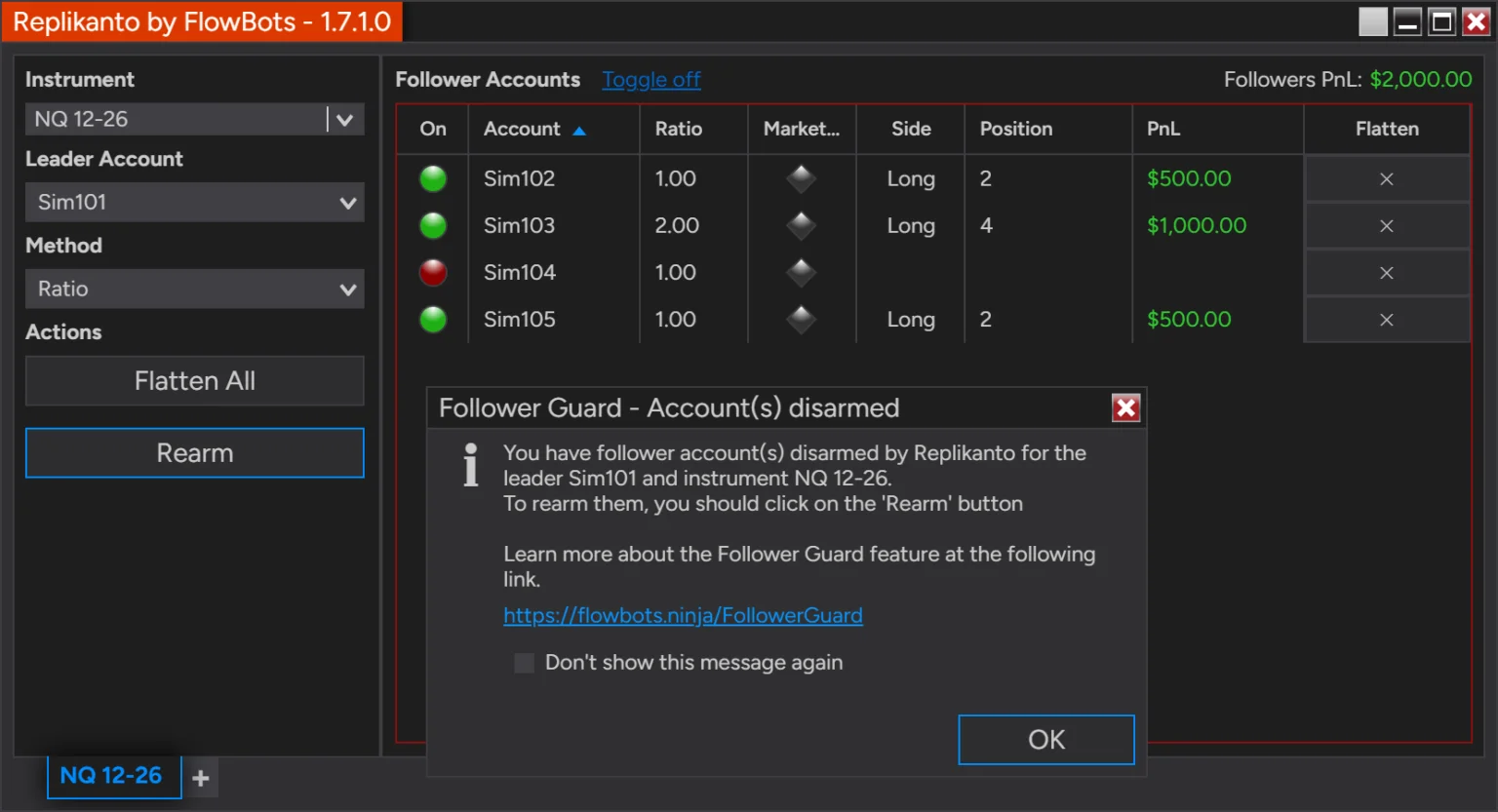
FlowBots describes Replikanto as a trade copier add-on for NinjaTrader 8: you trade one account, the leader, and it places the matching orders on your follower accounts, “entries, exits, stop and target moves, cancellations and OCO brackets.” It runs inside NinjaTrader; it does not connect to a broker or a prop firm by itself.
- Order sources copied: Chart Trader, SuperDOM, ATM strategies, NinjaScript strategies and FlowBots' Scalper Ticket. Market, Limit, Stop Market, Stop Limit and MIT orders are supported.
- Sizing: seven copy methods (Exact Quantity, Pooled Quantity, Ratio, Pre Allocation, Net Liquidation, Available Cash, Pct Change). Ratio accepts values from -100 to 100 in the standard version; a negative ratio copies the trade in the opposite direction.
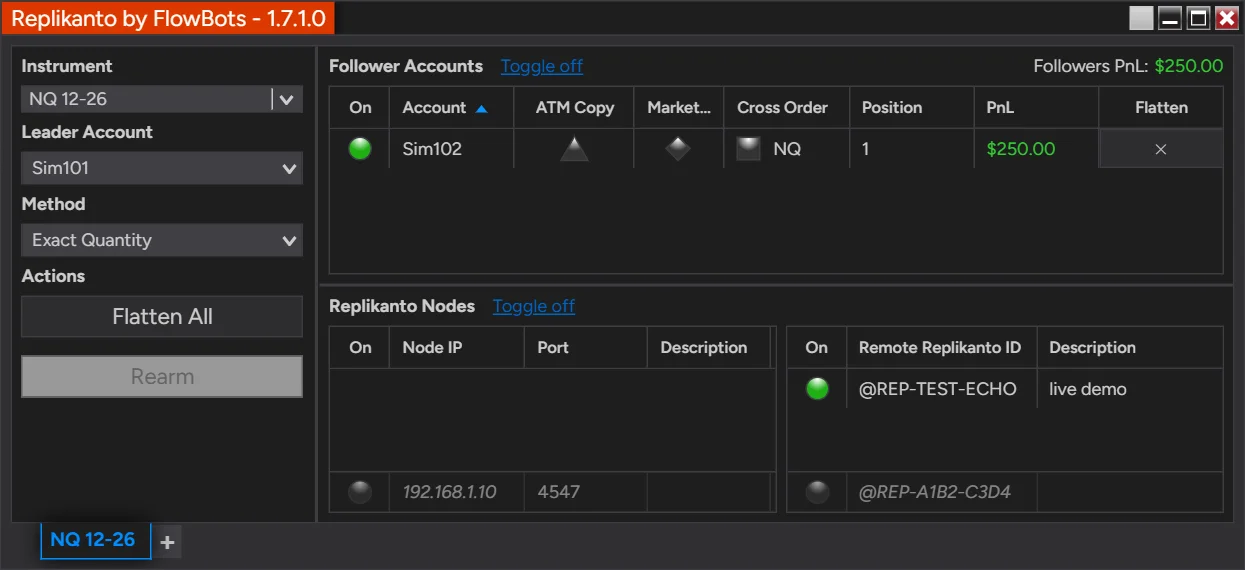
- Cross Order: trade one contract size and copy another of the same product, for example ES on the leader and MES on a follower; the default map covers 36 futures families.
- ATM Copy: each follower runs the leader's NinjaTrader ATM strategy on its own position instead of copying exit orders one by one.
- Follower Guard: optional protections that can cancel an unfilled entry, flatten a follower that falls out of sync or is in the opposite direction, flatten on a broker rejection, disarm the follower and send an e-mail.
- Follower groups: list followers by broker connection or in custom groups, and turn on, size or flatten a whole group at once.
- Several computers: copying to another computer over a local network or over the internet, with a license on each computer. Internet copying uses Submit credits (one per order sent to each remote computer); local copying does not.
Each Replikanto tab copies one leader account on one instrument; other accounts or instruments need more tabs or windows.
Platforms and Connections
| Item | What FlowBots states |
|---|---|
| Platform | NinjaTrader 8.1.6 or later (8.1.7 or later to copy between Playback accounts). One build for every supported version. |
| Operating system | Windows. On a Mac, in a Windows virtual machine, which FlowBots does not support. |
| Connections | Accounts connected to NinjaTrader 8: Rithmic (including prop firm accounts on Rithmic), Tradovate, Interactive Brokers, other NinjaTrader brokers, Sim and Playback accounts. |
| CQG | A help article says it copies between prop firms on Rithmic and CQG in one NinjaTrader, with NinjaTrader’s Multi-provider option for different connections. Not listed on the product page. |
| Tradovate and TradingView | With a Tradovate leader connected to NinjaTrader Desktop, orders placed from Tradovate web, mobile or TradingView are copied. NinjaTrader still runs on Windows. |
| Number of accounts | Not stated as a limit. Licenses are counted per computer: copying between accounts in one NinjaTrader needs one license. |
Licenses and Listed Prices
Listed price on flowbots.ninja on November 20, 2026, in USD. The FlowBots checkout is the final word on price and taxes.
| License | Term | Computers | Listed price |
|---|---|---|---|
| Free trial | 7 calendar days | 2 | Free |
| Single Machine | 1 year | 1 | $249.00 |
| 2 Machines | 1 year | 2 | $299.00 |
| Single Machine | Lifetime | 1 | $299.00 |
| 2 Machines | Lifetime | 2 | $399.00 |
- Every license and the trial include 20 Submit credits for internet copying; more credits are sold separately.
- Lifetime: “Pay once. The license never expires.” It includes one year of updates and priority support; after that the add-on keeps working and renewing is optional.
- 1 year: updates and support while valid; it stops working at expiry unless renewed and cannot be converted to lifetime.
- Extra computers: an Additional Machines license is sold separately.
- Refunds (Terms & Conditions, section 6): full refund within 14 calendar days of purchase, one refund per product per user; support and updates extensions are non-refundable.
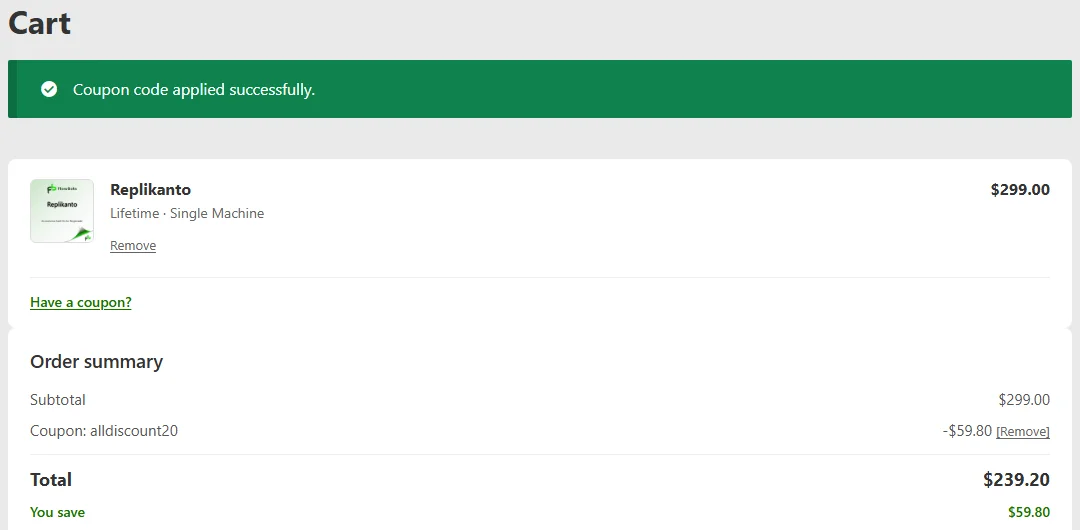
Code alldiscount20: 20% off Replikanto
Checked in the FlowBots cart on November 20, 2026: Lifetime · Single Machine went from $299.00 to $239.20. The code applies to Replikanto only, not to other FlowBots products or add-ons. The checkout is the final word.
DealPropFirm has an affiliate agreement with FlowBots: we may earn a commission if you buy through our links, at no extra cost to you. See our disclosure.
Compliance Mode for Prop Firms
FlowBots publishes a separate build, Replikanto Compliance Mode, that removes three features it says prop firms flag:
- Remote and network copy: no copying over the internet or a local network.
- Negative ratios: Ratio accepts 0 to 100 only, so a follower cannot be set to trade against the leader.
- Stealth Mode: the option that keeps Replikanto's own identifiers out of the information recorded with your orders.
Local copying between accounts in one NinjaTrader on one computer still works. According to FlowBots, it is free for existing customers, a trial unlocks the download, and only one version can be installed in a given NinjaTrader: installing Compliance Mode replaces the standard version, and the reverse. The window title shows “Compliance Mode”.
FlowBots' help center says two firms have explicitly approved Compliance Mode, naming “TPT and ETF”. We did not confirm this with either firm. On the firm side, Take Profit Trader's own blog names “Replikanto (Compliance Edition)” among trade copiers. FlowBots tells users to confirm approval with their firm before use.
One point to read carefully: FlowBots says Compliance Mode can still copy between accounts at different prop firms connected in the same NinjaTrader. A firm's own rule decides whether that is allowed: Apex bans copying to or from any third-party account.
Which Prop Firms Allow a Trade Copier
The line the firms draw is about whose accounts you copy, not about which copier you use. Copying between your own accounts at the same firm is what most of them allow. Copying across firms is stated as allowed by FundedNext Futures only (outbound only at FundingPips) and banned at Apex. Copying another trader or a signal service is banned wherever a firm addresses it.
The summary below comes from our copy trading and multiple accounts guide, which quotes each firm's official pages, read on November 20, 2026. The last column says whether the firm's own page names Replikanto; no firm page we read names it as approved or required. Whether a firm's accounts connect to NinjaTrader is covered in NinjaTrader prop firms.
| Firm | Copy between your own accounts | Copy across firms | Copier tools named by the firm |
|---|---|---|---|
| Apex Trader FundingOfficial site | Allowed across PA accounts under your personal and business name; each order is placed manually in one account and the others “merely replicate” it. “No Automation or Algorithm Usage allowed.” | Banned: copying to or from “any third-party account” is prohibited. | Tradovate Group Trade. |
| BulenoxOfficial site | Allowed per the FAQ (“trade copiers are permitted”); the Terms of Use require third-party trading technology to be approved by Bulenox before use. | Not stated. | None named. |
| Earn2TradeOfficial site | Banned: trade copiers are not permitted on evaluations or on LiveSim/Live accounts. | The general copier ban applies. | None. |
| FTMOOfficial site | FTMO Futures: allowed across accounts registered to the same trader. CFD: not stated. | Not stated; the Futures FAQ says “no copy trading across registrations is allowed”. | None named. |
| FundedNextOfficial site | Futures: “Traders can freely copy trades between their own FundedNext accounts.” CFD: between your own Challenge Accounts only. | Futures: allowed if you own all accounts involved. CFD: not stated. | Futures: Tradovate’s built-in copier, Replikanto, other third-party copiers for your own trades. |
| FundingPipsOfficial site | Allowed between your own FundingPips accounts. | Outbound only: a FundingPips account may lead an external account, never follow one. | FundingPips’ own Trade Copier. |
| Lucid TradingOfficial site | Allowed: “in-platform/third party trade copiers are permitted”; the trader is responsible for software errors. | Not stated as a copying rule; hedging between firms is prohibited. | None named. |
| MyFundedFuturesOfficial site | Allowed “across all account types”. | Not stated. | Tradesyncer, Tradovate’s built-in group copier, external copiers. |
| Take Profit TraderOfficial site | Allowed on test accounts and on up to 5 PRO accounts; copier activity is treated as your own execution. | Not stated. | Blog names Replikanto (Compliance Edition), with Tradovate Group Trade, Tradesyncer and others. |
| The5ersOfficial site | Allowed across your own accounts, with conditions (Bootcamp; Futures 25K and 50K only). | Not stated as a copying rule; opposite positions across providers are prohibited. | None named. |
| TopstepOfficial site | Allowed: “You can also use a trade copier to duplicate trades across multiple accounts.” Two help pages differ on Live Funded Accounts. | Not stated. | TopstepX Trade Copier. |
| TradeifyOfficial site | Allowed only between accounts you personally own and manage, in the same direction. | Not stated as a copying rule; running the same bot across multiple firms is against its policy. | Tradovate Group Trading, WealthCharts Trade Copier; third-party copiers “at your own risk”. |
“Not stated” means no rule was found on the pages read; it does not mean the practice is allowed. Your own dashboard and agreement prevail.
Limits to Know Before Buying
- NinjaTrader on Windows only. Accounts that do not connect to NinjaTrader 8 cannot be leaders or followers. TradingView trading works only through a Tradovate leader, with NinjaTrader running.
- No sync guarantee. Replikanto's Terms of Use say it “does not guarantee positions or orders synchronization”, that a follower order can be rejected, and that monitoring every follower is your responsibility.
- Opposite positions. In the standard version a negative ratio, or a follower left out of sync, can leave accounts on opposite sides. Every firm in our guide that states a rule bans hedging across accounts, and Tradeify calls an inverted copier a hedging violation. FlowBots describes Follower Guard as “reactive, not preventive”.
- Broker and platform limits. The Terms of Use warn that copying can hit broker API rate limits and that NinjaTrader may give limited support when third-party add-ons are used.
- Firm rules come first. Earn2Trade bans trade copiers; Apex requires each order to be placed manually in one account and bans automation; Bulenox requires approval of third-party trading technology. The Replikanto Terms of Use state: “Some prop firms (brokers) do not authorize the use of Replikanto.”
Copiers the Firms Name Themselves
Some firms point to a copier on their own platform or a partner tool: TopstepX Trade Copier (Topstep), Tradovate's group copier (Apex, MyFundedFutures, Tradeify, FundedNext Futures), Tradesyncer (MyFundedFutures' “preferred trade copier partner”), WealthCharts Trade Copier (Tradeify) and FundingPips' own Trade Copier. Apex describes Tradovate Group Trade as “a limited trade copier” that does not support bracket orders and cannot be used within TradingView. We list these as the firms name them, in no order.
Replikanto FAQ
What is Replikanto?
A trade copier add-on for NinjaTrader 8, sold by FlowBots. You trade one leader account and Replikanto places matching orders on your follower accounts: entries, exits, stop and target moves, cancellations and OCO brackets. It requires NinjaTrader 8.1.6 or later and runs on Windows.
How much does Replikanto cost?
Listed prices on flowbots.ninja on November 20, 2026: 1 year at $249.00 (one computer) or $299.00 (two computers); lifetime at $299.00 (one computer) or $399.00 (two computers). A free 7-day trial covers two computers. The FlowBots checkout is the final word on price.
Does Replikanto work with prop firm accounts?
It copies between any accounts connected in NinjaTrader 8, including Rithmic, Tradovate and Sim accounts, so prop firm accounts that connect to NinjaTrader can be leaders or followers. Whether you may use it is the firm’s decision: FlowBots itself says some prop firms do not allow trade copiers.
Can I use Replikanto on Apex accounts?
Apex allows copy trading across your own PA accounts, with each order placed manually in one account. Apex bans copying to or from any third-party account, including another firm’s. FlowBots says Apex is not on its list of firms that approved Compliance Mode and advises confirming with Apex.
What is Replikanto Compliance Mode?
A separate build of Replikanto without remote and local network copying, without negative ratios and without Stealth Mode. Local copying between accounts in one NinjaTrader on one computer still works. FlowBots says it is free for existing customers and that a trial also unlocks the download.
Can Replikanto copy TradingView trades?
Only through Tradovate: you place trades in TradingView on a Tradovate account, that account is connected to NinjaTrader Desktop, and Replikanto uses it as the leader. NinjaTrader and Replikanto still have to run on a Windows PC.
Does Replikanto have a refund policy?
The FlowBots Terms & Conditions allow a full refund within 14 calendar days of purchase, limited to one refund per product per user. Support and updates extensions are non-refundable, and renewal payments are not refundable once a new billing period has begun.
Sources and method
Product facts, prices and terms come from FlowBots' own pages and help center, read on November 20, 2026. Where a fact is not on those pages, the page says so instead of estimating. Firm rules come from the firms' official pages as quoted in our copy trading guide (sources listed there). DealPropFirm does not rate Replikanto, and this page has no score or stars. DealPropFirm has an affiliate agreement with FlowBots.
Some links on this page are affiliate links: DealPropFirm may earn a commission at no extra cost to you. Partner status never decides which firms are listed or in what order. See our disclosure.
- FlowBots — Replikanto product page (features, licenses, Licensing & FAQ): flowbots.ninja/product/replikanto/ (read November 20, 2026)
- FlowBots — Terms & Conditions (section 6, refunds): flowbots.ninja/terms-and-conditions/ (read November 20, 2026)
- FlowBots — Replikanto Terms of Use: flowbots.ninja/replikanto-terms-of-use/ (read November 20, 2026)
- FlowBots help center — Replikanto Compliance Mode for prop firms: support.flowbots.ninja/hc/en-us/articles/43051392017556-Replikanto-Compliance-Mode-for-prop-firms (read November 20, 2026)
- FlowBots help center — Can I use Replikanto to copy Apex accounts?: support.flowbots.ninja/hc/en-us/articles/35617927369876-Can-I-use-Replikanto-to-copy-Apex-accounts (read November 20, 2026)
- FlowBots help center — Can I copy between prop firms on Rithmic and CQG?: support.flowbots.ninja/hc/en-us/articles/35498172345620-Can-I-copy-between-prop-firms-on-Rithmic-and-CQG (read November 20, 2026)
- FlowBots help center — Can I copy trades from TradingView to follower accounts?: support.flowbots.ninja/hc/en-us/articles/25682125057428-Can-I-copy-trades-from-TradingView-to-follower-accounts (read November 20, 2026)
- FlowBots help center — What is counter-position trading and how to avoid it?: support.flowbots.ninja/hc/en-us/articles/43809665778580-What-is-counter-position-trading-and-how-to-avoid-it (read November 20, 2026)