Best Free TradingView Indicators
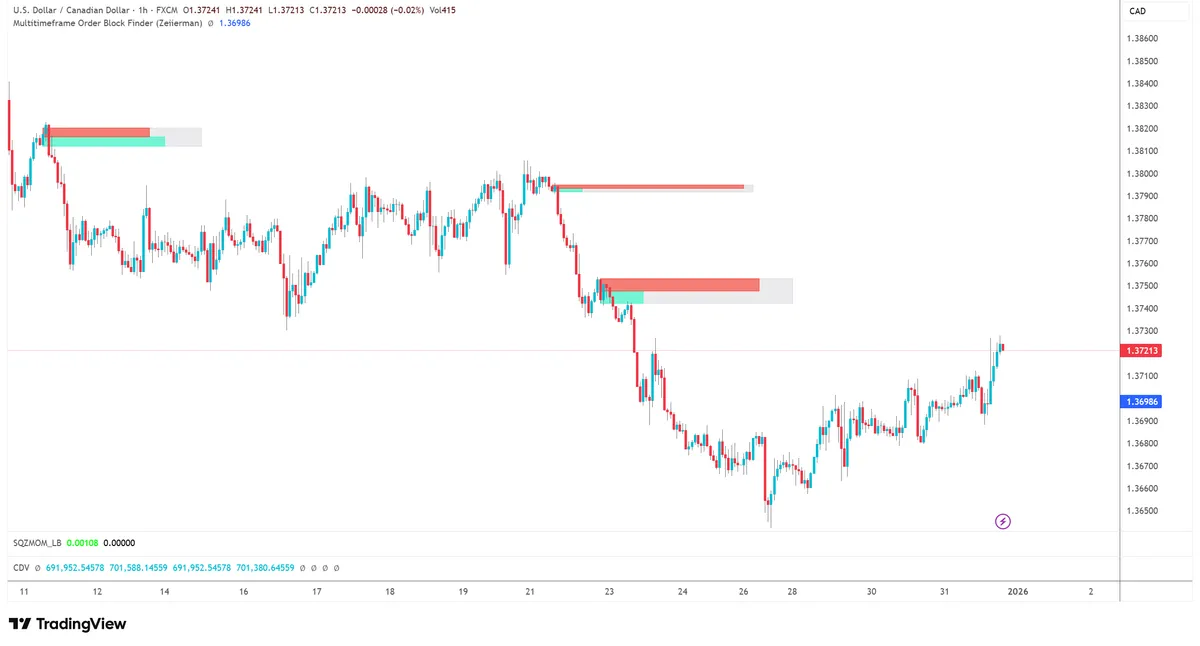
SMC Indicators (Smart Money Concepts)
Smart Money Concepts has revolutionized how retail traders analyze the markets. These indicators help you identify institutional order flow, market structure shifts, and high-probability entry zones.
1. Smart Money Concepts by LuxAlgo ⭐⭐⭐⭐⭐
TradingView Link: Search "Smart Money Concepts LuxAlgo" in indicators
What it does: This is arguably the most comprehensive free SMC indicator available. It automatically identifies: - Break of Structure (BOS) - Continuation signals - Change of Character (CHoCH) - Reversal signals - Order Blocks (OB) - Institutional entry zones - Fair Value Gaps (FVG) - Price imbalances - Equal Highs/Lows (EQH/EQL) - Liquidity pools - Premium and Discount zones - Value areas
Recommended Settings: - Swing Length: 10 (increase for higher TF, decrease for scalping) - Market Structure: All (or Internal for cleaner charts) - Show Order Blocks: ON - Order Block Mitigation: ON - Show FVG: ON, Auto Threshold - Premium/Discount Zones: ON - Equal Highs/Lows: ON
Why traders love it: LuxAlgo is known for clean, professional-looking indicators. This one doesn't clutter your chart while still providing all essential SMC elements. The code is well-optimized so it won't slow down your charts.
Strategy: The CHoCH + Order Block Entry
This strategy uses the Change of Character signal combined with order blocks for high-probability reversal entries.
Setup rules: 1. Identify the trend: Look at recent BOS signals to understand current direction 2. Wait for CHoCH: This signals a potential reversal 3. Mark the Order Block: The candle(s) that caused the CHoCH 4. Wait for retracement: Price should pull back to the order block 5. Entry trigger: Enter when price touches the OB with a confirmation candle (engulfing, pin bar, etc.) 6. Stop loss: Place stop below/above the order block with 2-5 pip buffer 7. Take profit: Target the next swing high/low or opposing order block
Risk Management: - Risk per trade: 1% of account - Minimum R:R: 1:2 - Max trades per day: 2-3 using this strategy - Win rate expectation: 50-60%
Best timeframes: 15min for day trading, 1H for intraday swings, 4H for swing trades
When to use: During London and New York sessions when institutional activity is highest. Avoid during low-volume Asian session.
---
2. SMC Community by Algoat ⭐⭐⭐⭐⭐
TradingView Link: Search "SMC Community Algoat" in indicators
What it does: A community-favorite indicator that provides: - Market structure identification with clear labels - Order blocks with refinement options (regular + refined OBs) - Breaker blocks - Failed order blocks that flip - Mitigation blocks - Fair value gaps with fill tracking - Liquidity levels and sweeps
Recommended Settings: - Pivot Length: 5 (default, adjust based on TF) - Show Internal Structure: OFF (cleaner charts) - Show Swing Structure: ON - Show OB: ON - OB Refinement: ON (shows smaller, more precise OBs) - Max OB Display: 5 (prevents clutter) - Show Breakers: ON - This is KEY for reversal trades - Show FVG: ON
Why traders love it: The customization options are extensive. You can adjust sensitivity, colors, and which elements to display. The breaker block feature is particularly valuable as many indicators don't include this. Regular community updates keep it current.
Strategy: The Breaker Block Reversal
Breaker blocks form when an order block gets "broken" and flips from support to resistance (or vice versa). They often provide excellent reversal entries.
Setup rules: 1. Identify a valid order block: The indicator will mark these automatically 2. Wait for the break: Price must break through the order block with momentum 3. OB becomes Breaker: The broken OB now acts as resistance (if was support) or support (if was resistance) 4. Wait for retest: Price typically returns to test the breaker 5. Entry: Enter on the retest with confirmation candle 6. Stop loss: Place stop beyond the breaker block (where it would be invalidated) 7. Take profit: Target the low/high that created the original move
Risk Management: - Risk per trade: 1-1.5% of account - Minimum R:R: 1:2.5 (breakers often give extended moves) - Max trades per day: 2 setups - Win rate expectation: 45-55% (but higher R:R compensates)
Best timeframes: 1H and 4H for most reliable breaker blocks, Daily for swing trades
When to use: After major liquidity sweeps or during trend reversals. Breakers work best after a strong impulse move.
---
3. TTF SMC ⭐⭐⭐⭐
TradingView Link: Search "TTF SMC" in indicators
What it does: A straightforward SMC indicator focused on core concepts: - Clean market structure visualization - Order block identification - BOS and CHoCH signals with clear labels - Simple, uncluttered display - Fast loading on any device
Recommended Settings: - Length: 5 (for 15m-1H) or 10 (for 4H+) - Show All Structures: OFF (show only significant ones) - Show Labels: ON - Historical OBs: 3-5 maximum
Why traders love it: It's lightweight and doesn't slow down your chart. Perfect for traders who want SMC basics without overwhelming visuals. Great for beginners learning SMC concepts.
Strategy: The Simple Structure Trade
This beginner-friendly strategy follows market structure for trend-following trades.
Setup rules: 1. Identify the current trend: Look at BOS signals - consecutive higher highs = uptrend 2. Determine bias: In an uptrend, ONLY look for buy setups (and vice versa) 3. Wait for pullback: Price should retrace to a bullish order block 4. Confirmation: Look for rejection candle from the OB (wick, engulfing, etc.) 5. Entry: Enter on candle close that confirms rejection 6. Stop loss: Below the order block with small buffer (account for spread) 7. Take profit: Previous swing high or 1:2 risk-reward minimum
Risk Management: - Risk per trade: 0.5-1% (good for beginners) - Minimum R:R: 1:2 - Max trades per day: 3-4 setups - Win rate expectation: 55-65% (trend following has higher win rate)
Best timeframes: 15min for active day trading, 1H for less screen time
When to use: During clearly trending markets. Avoid during consolidation or choppy price action - wait for clear BOS before trading.
---
4. Market Structure by TFlab ⭐⭐⭐⭐⭐
TradingView Link: Search "Market Structure TFlab" in indicators
What it does: Focuses specifically on market structure with advanced features: - Swing high/low identification - BOS labels with price levels - CHoCH labels with clear marking - Multi-timeframe structure analysis (key feature) - Clean visualization options - Structure breaks with alerts
Recommended Settings: - Pivot Strength: 3 (lower = more signals, higher = stronger signals) - Show Internal: ON or OFF depending on preference - Show Swing: ON (always) - Enable MTF: ON - Higher TF: Set to 4x your chart TF (e.g., 1H chart = 4H MTF) - Show HTF Structure: ON
Why traders love it: The multi-timeframe feature is a game-changer. You can see higher timeframe structure on your execution timeframe without switching charts. This alignment dramatically improves trade quality.
Strategy: Multi-Timeframe Confluence
This strategy aligns multiple timeframe structures for higher probability trades.
Setup rules: 1. Set up MTF: Enable higher timeframe structure display 2. Check HTF bias: What is the 4H structure telling you? (bullish/bearish) 3. Check LTF structure: Does your execution TF agree with HTF? 4. Alignment required: ONLY trade when both timeframes agree on direction 5. Entry: In bullish HTF + bullish LTF = Look for longs at LTF order blocks 6. Stop loss: Below LTF structure point 7. Take profit: HTF target levels or structure points
Example: - 4H showing bullish structure (higher highs, higher lows) - 15m also showing bullish structure - Enter long at 15m order block - Target: 4H resistance level
Risk Management: - Risk per trade: 1-2% (higher conviction trades) - Minimum R:R: 1:3 (MTF alignment often gives big moves) - Max trades per day: 1-2 high-quality setups - Win rate expectation: 50-55% (but excellent R:R)
Best timeframes: 5min execution with 1H structure, or 15min with 4H structure
When to use: Always – this strategy naturally filters out low-probability setups. If timeframes don't align, simply don't trade.
Session & Killzone Indicators
Understanding trading sessions is crucial for timing your entries. These indicators help you identify the most volatile and profitable trading windows. Most professional traders only trade during specific "kill zones."
---
7. ICT Killzones & Pivot Points ⭐⭐⭐⭐⭐
TradingView Link: Search "ICT Killzones" in indicators
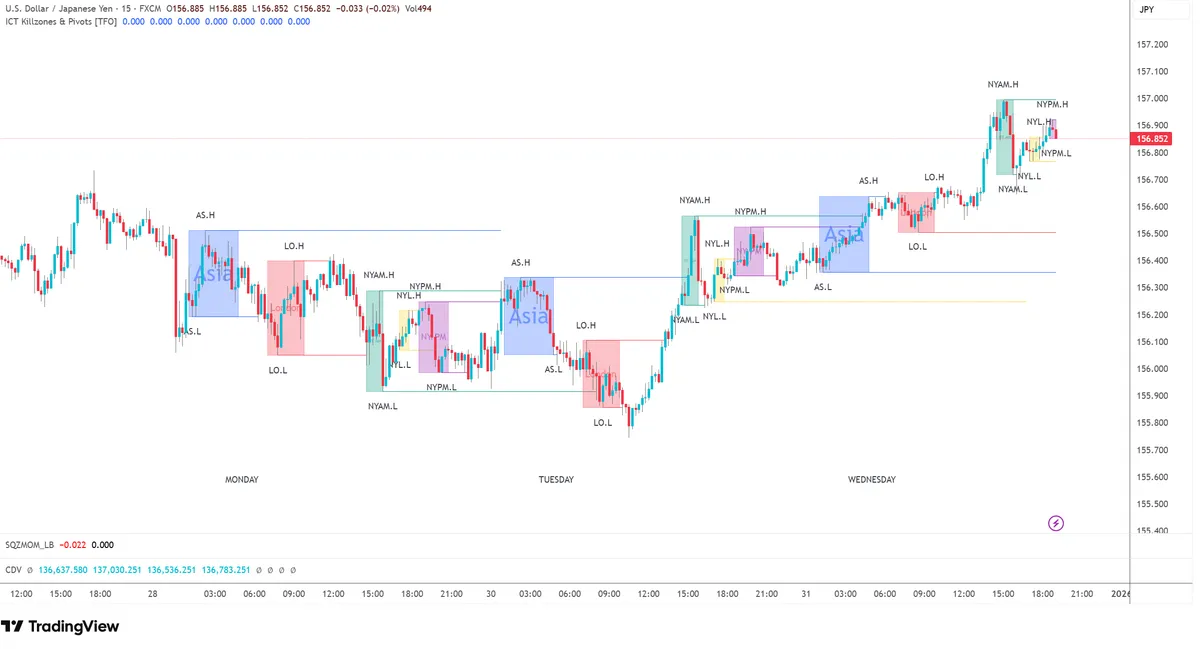
What it does: Displays the key ICT trading sessions with visual boxes: - Asian session (8 PM - 12 AM EST) - Accumulation range - London Killzone (2 AM - 5 AM EST) - High volatility - New York Killzone (8 AM - 11 AM EST) - High volatility - London Close (10 AM - 12 PM EST) - Reversal window - Session highs and lows with automatic tracking - Pivot points from previous sessions (Daily, Weekly)
Recommended Settings: - Show Asian Session: ON (color: Gray/Yellow, 20% opacity) - Show London KZ: ON (color: Blue, 30% opacity) - Show NY KZ: ON (color: Green, 30% opacity) - Show London Close: ON (color: Orange, 20% opacity) - Show Session High/Low: ON - Line Style: Dashed - Extend Lines: Current session only - Show Daily Pivots: ON - Show Weekly Pivots: ON (optional)
Why traders love it: Visual session boxes make it easy to see where the "smart money" is most active. The 80/20 rule applies: 80% of good setups happen during the 20% of time that falls within killzones. The pivot points add confluence for entries.
Strategy: Killzone Breakout Trade
Trade the breakouts that occur during killzone hours after liquidity sweeps.
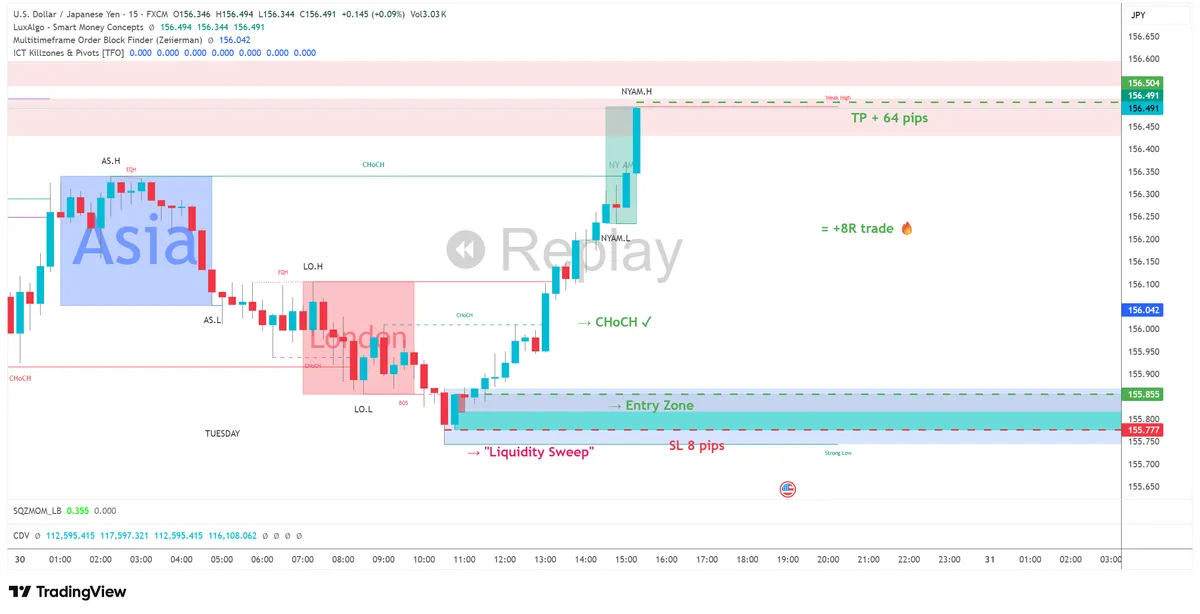
Setup rules: 1. Pre-session: Mark the Asian session range before London open (high and low) 2. Wait for Killzone: Only trade once London or NY killzone begins 3. Watch for sweep: Look for a sweep of Asian high OR low (not both) 4. Identify the liquidity grab: Quick spike through level then rejection 5. Wait for structure shift: After sweep, need CHoCH or BOS in new direction 6. Entry: Enter in the new direction after structure confirms 7. Stop loss: Beyond the swept level (the manipulation high/low) 8. Take profit: - TP1: Opposite end of Asian range - TP2: 2x the Asian range size
Risk Management: - Risk per trade: 1% - Minimum R:R: 1:2 (TP1) to 1:4 (TP2) - Max trades per session: 1 per killzone (max 2 per day) - Win rate expectation: 50-55%
Best timeframes: 15min for analysis, 5min for entry refinement
When to use: Exclusively during killzone hours. If you miss the setup, wait for the next killzone. Don't force trades outside these windows.
---
8. Killzones by Joshuu ⭐⭐⭐⭐
TradingView Link: Search "Killzones Joshuu" in indicators
What it does: A cleaner, more customizable killzone indicator: - Fully adjustable session times for any market - Color-coded sessions with opacity control - Session open price lines - High/low tracking per session - Works for all markets (forex, indices, crypto, stocks) - Timezone adjustment feature
Recommended Settings: - Use Exchange Timezone: ON (or set manual) - Asian Session: 00:00 - 08:00 (exchange time) - London Session: 08:00 - 12:00 - NY Session: 13:00 - 17:00 - Box Style: Filled with border - Opacity: 15-25% - Show Open Line: ON - Open Line Style: Solid, 2px - Show High/Low: ON
Why traders love it: The customization allows you to adapt it to any market's most active hours. Crypto traders can set their own volatile periods. Clean visuals don't clutter your chart. The session open line is particularly useful.
Strategy: Session Open Rejection
Trade rejections from session opening prices - a simple but effective approach.
Setup rules: 1. Identify session open: The indicator marks this automatically with a line 2. Wait for movement: Price will move away from the open initially 3. Watch for return: Price often returns to test the opening price 4. Look for rejection: Need clear rejection candle at the open line: - Pin bar / hammer - Engulfing candle - Strong wick rejection 5. Entry: Enter on rejection candle close 6. Stop loss: Beyond the rejection candle wick 7. Take profit: Session high or low (whichever is in your direction)
Risk Management: - Risk per trade: 0.5-1% - Minimum R:R: 1:1.5 - Max trades per session: 2 - Win rate expectation: 55-60%
Best timeframes: 15min, 5min for entry precision
When to use: During the first 2 hours of any major session (London, NY). The session open acts as a magnet - price often returns to it.
Trend & Momentum Indicators
These indicators help you identify trend direction and momentum for trend-following strategies. They're excellent for beginners and can be combined with SMC concepts.
---
12. UT Bot Alerts ⭐⭐⭐⭐⭐
TradingView Link: Search "UT Bot Alerts" in indicators
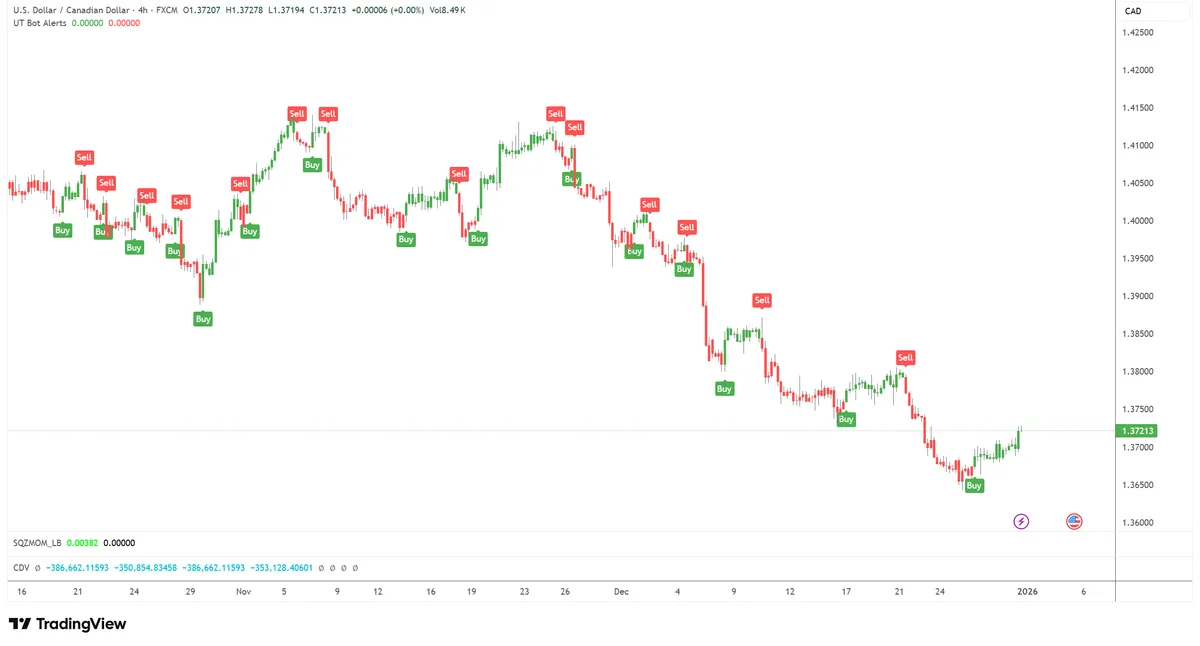
What it does: One of the most popular free indicators on TradingView: - Clear buy/sell signals based on ATR trailing stop - Visual signals with arrows - Customizable sensitivity via ATR multiplier - Built-in alert functionality - Works on any market
Recommended Settings: Main Settings: - Key Value (Sensitivity): 2 (lower = more signals, higher = fewer signals) - ATR Period: 10 (default)
For Day Trading (15m): - Key Value: 1.5 - ATR Period: 10
For Swing Trading (4H): - Key Value: 3 - ATR Period: 14
Display: - Show Buy/Sell Signals: ON - Show Trailing Stop Line: ON - Buy Color: Green arrow up - Sell Color: Red arrow down
Why traders love it: Simple but effective. Great for beginners who want clear entry signals without complexity. The ATR-based trailing stop adapts to market volatility automatically.
Strategy: UT Bot Trend Rider
Use UT Bot signals to ride trends with built-in trailing stops.
Setup rules: 1. Confirm trend: Before taking signal, check if price is: - Above recent swing low (for longs) - Below recent swing high (for shorts) 2. Wait for signal: Green arrow = buy, Red arrow = sell 3. Filter by structure: Only take signals in direction of market structure 4. Entry: Enter on signal candle close 5. Stop loss: Use the UT Bot trailing stop line (it moves with price) 6. Trail your stop: Continue using UT Bot line as trailing stop 7. Exit: When opposing signal appears OR stop is hit
Risk Management: - Risk per trade: 1% - R:R varies based on trend length (can be 1:5+ in strong trends) - Max trades per day: 2-3 - Win rate expectation: 45-50% (but good R:R)
Best timeframes: 1H, 4H for swing trades; 15min for day trades
When to use: In trending markets. Avoid during ranging/choppy conditions - the signals will whipsaw.
---
13. Supertrend by KivancOzbilgic ⭐⭐⭐⭐
TradingView Link: Search "Supertrend" in indicators
What it does: A classic trend indicator that's stood the test of time: - Current trend direction (color coded) - Dynamic support/resistance line - Color changes on trend flip - Multiple Supertrend lines option - Clean and simple visualization
Recommended Settings: Standard Settings: - ATR Length: 10 - Factor (Multiplier): 3
For Faster Signals (Day Trading): - ATR Length: 7 - Factor: 2
For Slower Signals (Swing Trading): - ATR Length: 14 - Factor: 3.5
Display: - Line Width: 2 - Uptrend Color: Green - Downtrend Color: Red - Fill Background: Optional (ON for clearer visual)
Why traders love it: Battle-tested indicator that's been around for years. Millions of traders use it. Simple trend identification that just works.
Strategy: Supertrend + Structure Combo
Combine Supertrend with market structure for filtered, higher-quality signals.
Setup rules: 1. Check Supertrend: Green = only longs, Red = only shorts 2. Confirm with structure: Need BOS in same direction as Supertrend 3. Wait for pullback: Price should pull back toward Supertrend line 4. Entry options: - Touch of Supertrend line with rejection - Pullback to structure level while above/below Supertrend 5. Stop loss: Beyond Supertrend line (when it would flip) 6. Take profit: 2x risk or at structure resistance/support
Risk Management: - Risk per trade: 1% - Minimum R:R: 1:2 - Max trades per day: 2-3 - Win rate expectation: 50-55%
Best timeframes: 1H, 4H for swing trading
When to use: For swing trading and position trading. Good for traders who don't want to watch charts all day.
---
14. EMA Ribbon ⭐⭐⭐⭐
TradingView Link: Search "EMA Ribbon" in indicators
What it does: Displays multiple EMAs as a visual ribbon: - Shows trend strength (tight ribbon = strong trend, spread = weak) - Shows trend direction (ribbon angle) - Helps identify pullback entry zones - Visual representation of momentum - Works as dynamic support/resistance
Recommended Settings: EMA Settings: - EMA 1: 8 (fastest) - EMA 2: 13 - EMA 3: 21 - EMA 4: 34 - EMA 5: 55 (slowest)
Or use these for smoother ribbon: - EMAs: 20, 25, 30, 35, 40, 45, 50
Display: - Line Width: 1 - Fill Between: ON (creates ribbon effect) - Bullish Color: Green gradient - Bearish Color: Red gradient
Why traders love it: The ribbon gives you instant visual feedback on trend strength. When EMAs are tightly packed and angled, the trend is strong. When they spread out and flatten, momentum is weakening.
Strategy: Ribbon Pullback Entry
Enter trends on pullbacks to the EMA ribbon.
Setup rules: 1. Confirm uptrend: Price above ribbon, ribbon fanned out upward, all EMAs ascending 2. Wait for pullback: Price pulls back INTO the ribbon (not through it) 3. Key zone: Best entries when price touches middle of ribbon (21-34 EMA area) 4. Confirmation: Wait for bullish candle that bounces off ribbon 5. Entry: Enter on bounce candle close 6. Stop loss: Below the entire ribbon 7. Take profit: Recent high or 1.5x-2x risk
Risk Management: - Risk per trade: 1% - Minimum R:R: 1:1.5 - Max trades per day: 3-4 - Win rate expectation: 55-65%
Best timeframes: 15min, 1H
When to use: In trending markets with clear momentum. The ribbon should be nicely fanned out and angled.
Volume & VWAP Indicators
Volume analysis and VWAP help you understand where significant trading activity occurs and where institutions are positioned. These are essential for day traders.
---
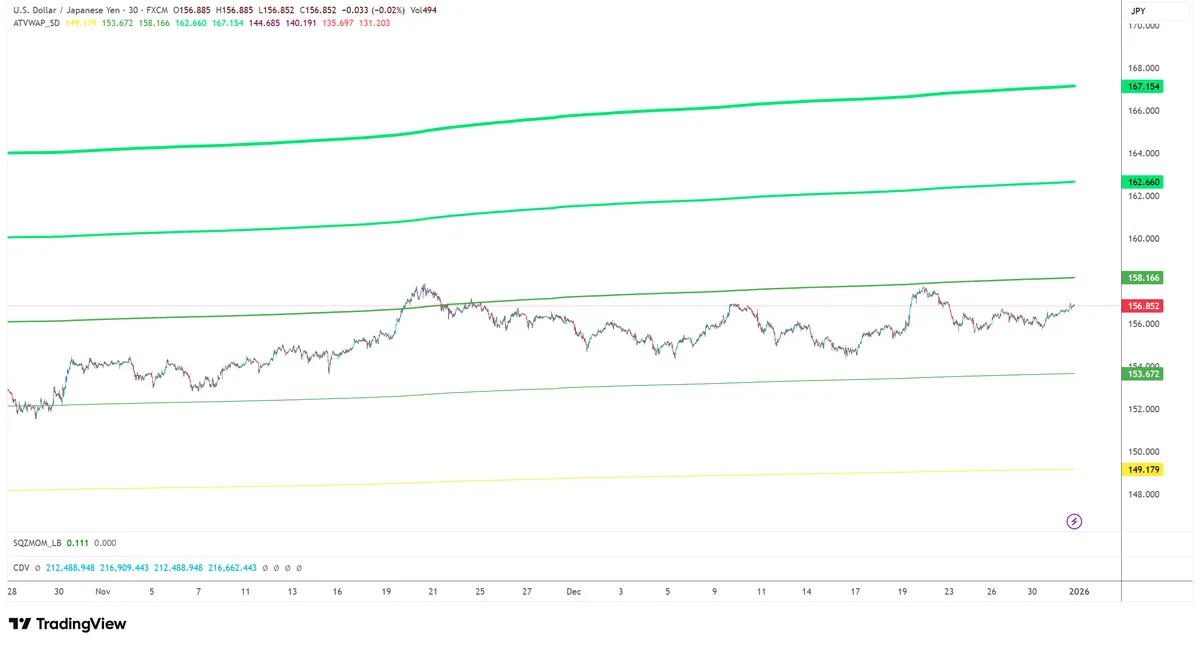
15. VWAP with Standard Deviation Bands ⭐⭐⭐⭐⭐
TradingView Link: Search "VWAP Standard Deviation" in indicators
What it does: Shows Volume Weighted Average Price with statistical bands: - VWAP line - The institutional average price for the session - Standard deviation bands (1, 2, 3 deviations) - Helps identify overextended conditions - Reset options (session, week, month) - Shows where big players are positioned
Recommended Settings: VWAP Settings: - Anchor Period: Session (resets each day) - Source: HLC3 (High + Low + Close / 3)
Bands: - Show Bands: ON - Band 1: 1.0 standard deviation - Band 2: 2.0 standard deviation - Band 3: 3.0 standard deviation (optional)
Display: - VWAP Color: Blue, 2px line - Band 1: Light blue - Band 2: Lighter blue - Band 3: Very light (if shown) - Fill Between Bands: ON, low opacity
Why traders love it: Institutions use VWAP for execution - it's their benchmark. If price is above VWAP, institutions who bought are in profit. If below, sellers are winning. Trading around VWAP puts you in line with institutional order flow.
Strategy: VWAP Mean Reversion
Trade mean reversion to VWAP when price is extended to the bands.
Setup rules: 1. Identify extension: Wait for price to reach 2nd or 3rd standard deviation band 2. Look for exhaustion: Signs price is overextended: - Long wicks at the band - Slowing momentum - Divergence with momentum indicator 3. Rejection confirmation: Need clear rejection candle from the band 4. Entry: Enter toward VWAP on rejection candle close 5. Stop loss: Beyond the deviation band (with buffer) 6. Take profit: - TP1: VWAP line - TP2: Opposing deviation band (rare, for runners)
Risk Management: - Risk per trade: 0.5-1% (mean reversion can be tricky) - Minimum R:R: 1:1.5 - Max trades per day: 3-4 - Win rate expectation: 55-60%
Best timeframes: 15min, 5min (VWAP is intraday indicator)
When to use: During ranging days or after extended moves. Works best when there's no strong trend.
---
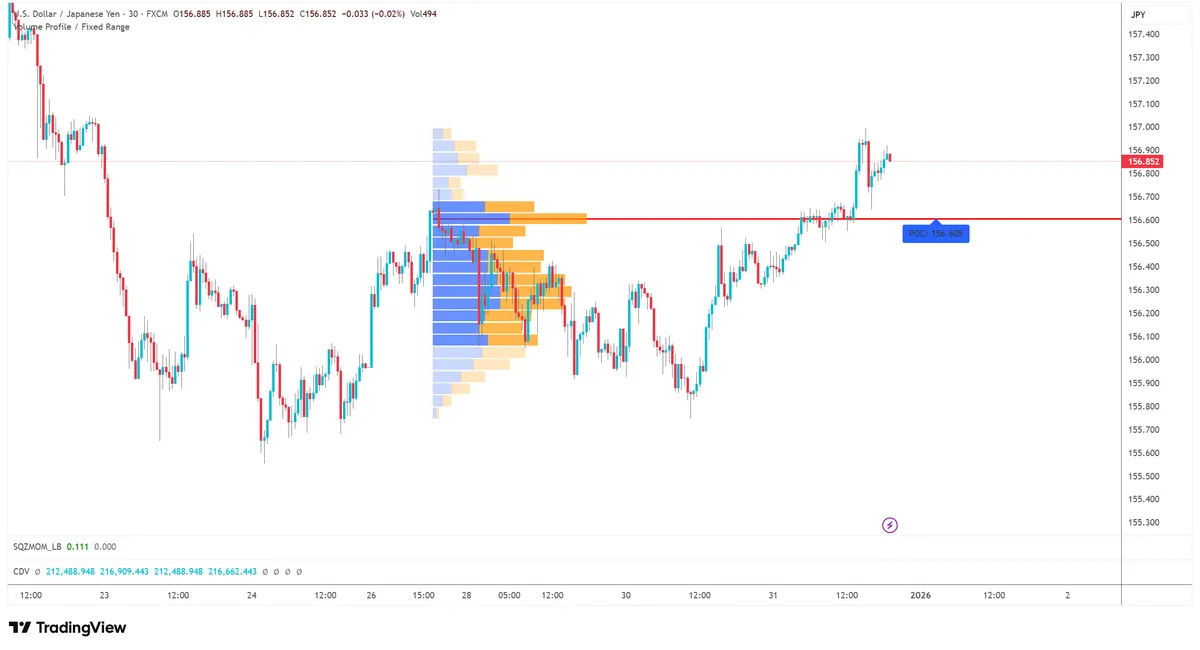
16. Volume Profile by LonesomeTheBlue ⭐⭐⭐⭐
TradingView Link: Search "Volume Profile LonesomeTheBlue" in indicators
What it does: Shows volume at each price level (not over time): - Point of Control (POC) - Price with highest volume - Value Area High (VAH) - Upper edge of 70% volume - Value Area Low (VAL) - Lower edge of 70% volume - Volume nodes (high and low volume areas) - Session or range-based profiles
Recommended Settings: Profile Settings: - Row Size: Auto (or 50-100 rows) - Value Area %: 70% (standard) - Session: Daily (or custom range)
Display: - Show POC: ON (red line, prominent) - Show VAH/VAL: ON (blue lines) - Profile Color: Based on buy/sell or single color - Profile Width: 30-50% of chart - Transparency: 60-70%
Levels: - Extend POC: ON - Extend VA: ON
Why traders love it: Volume Profile shows you where the most trading occurred – these are significant support/resistance levels that actually matter. Better than arbitrary horizontal lines.
Strategy: POC Bounce Trade
Trade bounces from Point of Control levels - these are institutional magnets.
Setup rules: 1. Identify previous session POC: The indicator marks this automatically 2. Morning routine: Note yesterday's POC, VAH, VAL before trading 3. Wait for approach: Price often returns to test previous POC 4. Entry option 1: Enter on first touch of POC with tight stop 5. Entry option 2: Wait for sweep through POC, then reversal 6. Stop loss: Beyond the low volume zone after POC 7. Take profit: VAH or VAL depending on direction
Risk Management: - Risk per trade: 1% - Minimum R:R: 1:2 - Max trades per day: 2-3 - Win rate expectation: 55-60%
Best timeframes: 15min, 1H
When to use: At session opens when price returns to previous day's POC. Also works for weekly POC on higher timeframes.
---
17. Previous Day High/Low/Close ⭐⭐⭐⭐⭐
TradingView Link: Search "Previous Day High Low Close" in indicators
What it does: Simple but essential levels: - Previous day's high (PDH) - Previous day's low (PDL) - Previous day's close (PDC) - Previous day's open (PDO) - optional - Option for multiple days back (2-day, 3-day highs/lows)
Recommended Settings: Levels: - Show Previous Day High: ON - Show Previous Day Low: ON - Show Previous Day Close: ON - Show Previous Day Open: Optional
Display: - PDH Color: Green, solid line - PDL Color: Red, solid line - PDC Color: Orange, dashed line - Line Width: 1-2px - Extend Lines: To right edge
Additional: - Show 2 Days Ago: Optional (for wider context) - Show Labels: ON
Why traders love it: These are THE most watched levels by all traders - retail and institutional. Clean, essential information without clutter. Every professional trader marks these levels.
Strategy: PDH/PDL Sweep and Reverse
Trade reversals after previous day high/low sweeps - pure liquidity play.
Setup rules: 1. Pre-session marking: PDH and PDL marked at session start (automatic) 2. Wait for approach: Price moves toward PDH or PDL 3. Watch for sweep: Price pokes through the level (taking stops) 4. Key recognition: Sweeps are liquidity grabs, not breakouts 5. Reversal signs: After sweep, look for: - Quick rejection wick - Opposite candle close - Structure shift 6. Entry: Enter on reversal confirmation 7. Stop loss: Beyond the swept level (new high/low) 8. Take profit: Opposite end (e.g., PDL if you shorted PDH sweep)
Risk Management: - Risk per trade: 1% - Minimum R:R: 1:3 (PDH to PDL is often large range) - Max trades per day: 1-2 - Win rate expectation: 50-55%
Best timeframes: 15min, 5min for entry
When to use: During the first hours of London or New York sessions. Most PDH/PDL sweeps happen during killzones.
How to Combine These Indicators
Using too many indicators creates confusion and analysis paralysis. Here's how to build effective, clean indicator combinations.
The Golden Rules
Rule #1: Less is More - Maximum 2-3 indicators on your chart - Each indicator should serve a DIFFERENT purpose - If two indicators tell you the same thing, remove one
Rule #2: Categories Matter Combine indicators from different categories for best results: - 1 Structure/Direction indicator - 1 Timing/Session indicator - 1 Confluence/Confirmation indicator
Rule #3: Match to Your Style - Scalpers: Need fast signals, session timing - Day traders: Need structure, killzones, liquidity - Swing traders: Need trend, HTF analysis
---
Recommended Combinations
Combo 1: SMC Day Trader 1. Smart Money Concepts by LuxAlgo (structure) 2. ICT Killzones (timing) 3. Previous Day High/Low (key levels)
Usage: 15min timeframe Strategy: Trade SMC setups only during killzones, targeting PDH/PDL Best for: Forex day traders
Combo 2: Clean Trend Follower 1. Supertrend (trend direction) 2. EMA Ribbon (momentum + pullback zones) 3. Volume Profile (key levels)
Usage: 1H/4H timeframe Strategy: Enter pullbacks to ribbon in Supertrend direction, target POC levels Best for: Swing traders, less screen time
Combo 3: ICT Purist 1. Market Structure by TFlab (structure + MTF) 2. HTF PO3 by Toodegrees (daily/weekly bias) 3. Liquidity Swings by LuxAlgo (targets)
Usage: Multi-timeframe analysis Strategy: Align HTF bias → LTF structure → Target liquidity Best for: ICT methodology followers
Combo 4: Intraday Scalper 1. UT Bot Alerts (signals) 2. VWAP with bands (value zones) 3. Killzones by Joshuu (timing)
Usage: 5min/15min timeframe Strategy: Take UT Bot signals during killzones, fade at VWAP bands Best for: Active scalpers
Combo 5: Liquidity Hunter 1. SMC Community by Algoat (structure + OBs) 2. Fair Value Gap by Flux (entry zones) 3. Previous Day High/Low (liquidity pools)
Usage: 15min-1H timeframe Strategy: Hunt PDH/PDL sweeps, enter at FVG/OB confluence Best for: Traders who understand liquidity concepts
Complete Trading Setup Example
Let's walk through a complete trade from start to finish using multiple indicators and concepts.
Scenario: EUR/USD Long Trade During London Session
Pre-Session Analysis (Before London Open)
Step 1: Check HTF Bias (4H chart) - Open HTF PO3 indicator: Weekly in distribution phase (bullish) - Check Market Structure: 4H showing bullish structure (HH, HL) - Conclusion: Looking for LONG trades only today
Step 2: Mark Key Levels - PDH: 1.0920 - PDL: 1.0850 - Previous session POC: 1.0880 - Note: PDL aligns with 4H order block = high confluence level
Session Trading (London Killzone)
Step 3: Watch Asian Session - Asian range: 1.0875 - 1.0895 (20 pip range) - Price consolidated = accumulation phase - Plan: Watch for sweep of Asian low (manipulation)
Step 4: London Open Manipulation - 2:30 AM EST: Price drops sharply - Sweeps Asian low (1.0875) - Sweeps into 4H order block zone - Also near PDL area = liquidity taken
Step 5: Wait for Confirmation - Watch for CHoCH on 15min - 3:15 AM: CHoCH confirmed (bullish) - New 15min order block forms at 1.0868
Step 6: Entry Execution - Price pulls back to 15min OB - FVG indicator shows gap above current price - Entry: 1.0872 (touching OB) - Stop Loss: 1.0858 (below OB + sweep low) = 14 pips risk
Step 7: Trade Management - TP1: Asian high 1.0895 = 23 pips (+1.6R) ✓ - Move stop to breakeven after TP1 - TP2: PDH 1.0920 = 48 pips (+3.4R) ✓
Result: +3.4R trade following the complete process

Founder & Editor
Jonathan is the founder of DealPropFirm.com, an independent comparison platform for prop trading firms. He personally tests prop firm evaluation processes, tracks promo codes and payout policies monthly, and publishes detailed reviews based on firsthand experience. His goal is to give traders transparent, data-driven comparisons so they can choose the right firm without relying on paid sponsorships or biased reviews.
- ✓Tested 50+ prop trading firms firsthand
- ✓Tracks promo codes and payout policies monthly
- ✓Helping 10,000+ traders find the right firm since 2024
- ✓Independent — not owned by any prop firm